0x00 版权声明 JAVA基础系列是笔者学习@炼石星球的笔记,大部分文字描述取自星球内发布的教程文件,仅作学习。
0x01 Multipartfile文件上传 MultipartFile是SpringMVC提供简化上传操作的工具类.
第一步,创建项目 参考上一篇文章JAVAWeb基础SpringBoot-SpringCloud ,创建Spring项目
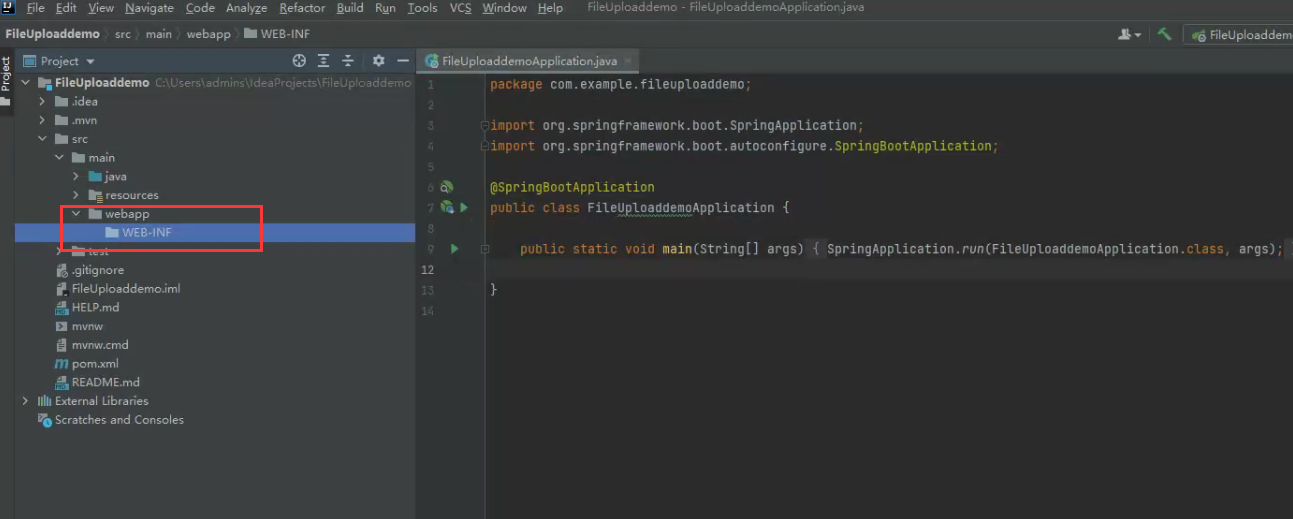
接着在main目录下新建 webapp 目录,然后在webapp目录下新建WEB-INF 目录:
WEB-INF 目录为JAVA WEB中安全目录,该目录仅允许服务端访问,客户端无法访问。该目录下有web.xml文件
接着在 pom.xml 文件中的 … 标签内添加JSP依 赖,并重载maven为了下载所添加的依赖
1
2
3
4
5
6
7
8
9
10
11
12
13
14
15
16
17
18
19
20
<!-- servlet 依赖 --> <dependency> <groupId>javax.servlet</groupId> <artifactId>javax.servlet-api</artifactId> <scope>provided</scope> </dependency> <dependency> <groupId>javax.servlet</groupId> <artifactId>jstl</artifactId> </dependency> <!-- tomcat 的支持.--> <dependency> <groupId>org.springframework.boot</groupId> <artifactId>spring-boot-starter-tomcat</artifactId> <scope>provided</scope> </dependency> <dependency> <groupId>org.apache.tomcat.embed</groupId> <artifactId>tomcat-embed-jasper</artifactId> </dependency>
接着在main.resources.application.properties里面进行配置:
1
2
3
4
5
6
7
8
# 应用名称 spring.application.name=FileUploaddemo # 应用服务 WEB 访问端口 server.port=7089 # 视图前缀 spring.mvc.view.prefix=/jsp/ # 视图后缀 spring.mvc.view.suffix=.jsp
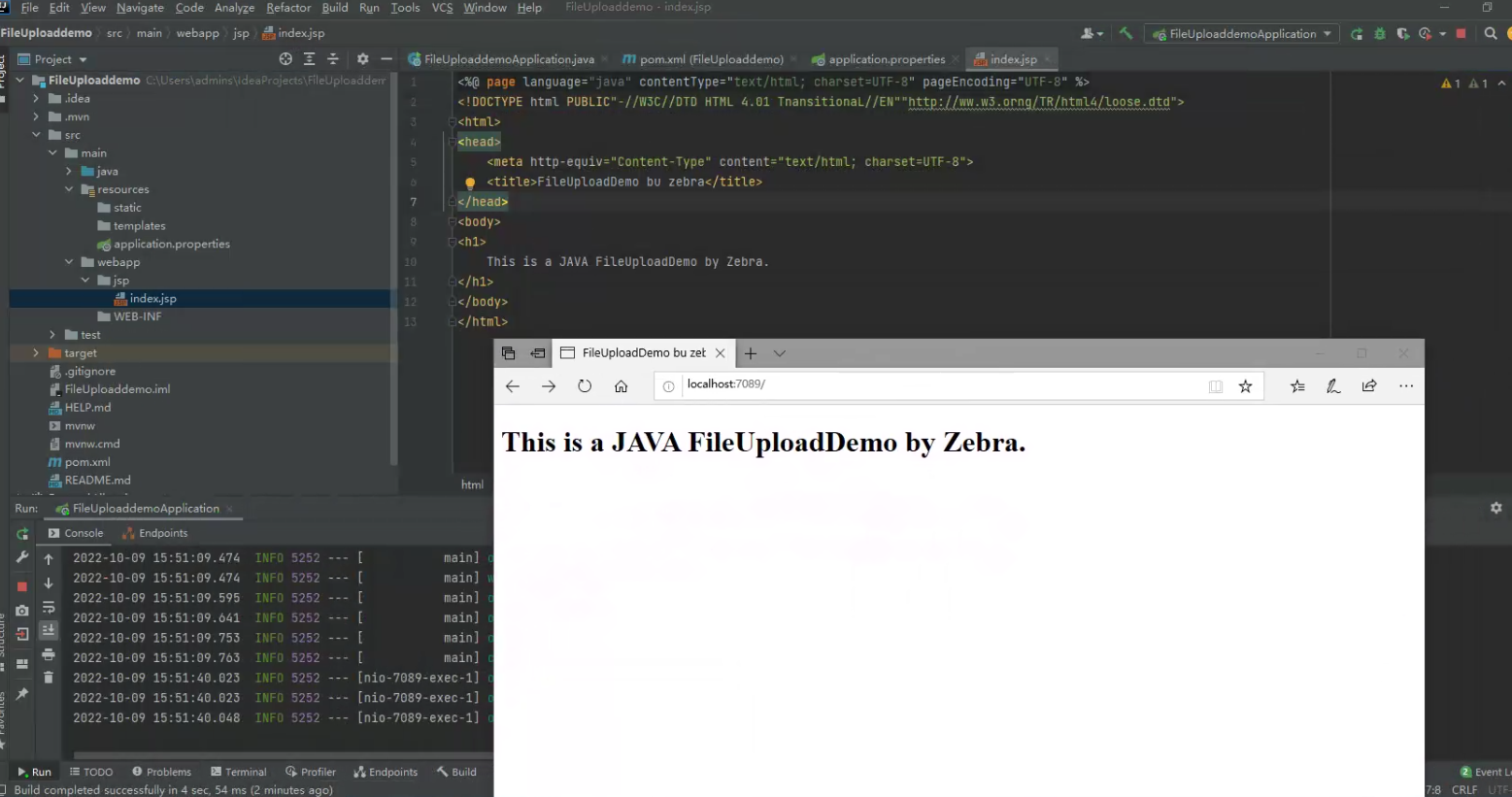
在webapp文件下创建jsp目录,并新建一个index.jsp文件,键入以下代码:
1
2
3
4
5
6
7
8
9
10
11
12
13
<%@ page language="java" contentType="text/html; charset=UTF-8" pageEncoding="UTF-8" %> <!DOCTYPE html PUBLIC"-//W3C//DTD HTML 4.01 TnansitionaL//EN" "<http://ww.w3.orng/TR/html4/loose.dtd>" > <html> <head> <meta http-equiv="Content-Type" content="text/html; charset=UTF-8" > <title>FileUploadDemo bu zebra</title> </head> <body> <h1> This is a JAVA FileUploadDemo by Zebra. </h1> </body> </html>
启动项目观察页面响应:
第二步,代码示例 在jsp目录新建一个multipartfileUpload.jsp文件,键入代码:
1
2
3
4
5
6
7
8
9
10
11
12
13
14
15
<%@ page contentType="text/html;charset=UTF-8" language="java" %> <html> <head lang="en" > <meta charset="UTF-8" /> <title>文件上传页面</title> </head> <body> <h1>文件上传页面</h1> <form method="post" action="/upload" enctype="multipart/form-data" > 选择要上传的文件:<input type="file" name="file" ><br> <hr> <input type="submit" value="提交" > </form> </body> </html>
接着在mian.java.com.example.fileuploaddemo目录新建一个multipartfileController.java文件,键入代码:
1
2
3
4
5
6
7
8
9
10
11
12
13
14
15
16
17
18
19
20
21
22
23
24
25
26
27
28
29
import org.springframework.beans.factory.annotation.Value;import org.springframework.stereotype.Controller;import org.springframework.web.bind.annotation.GetMapping;import org.springframework.web.bind.annotation.PostMapping;import org.springframework.web.bind.annotation.RequestPart;import org.springframework.web.bind.annotation.ResponseBody;import org.springframework.web.multipart.MultipartFile;import java.io.File;import java.io.IOException;import java.nio.file.Files;@Controller public class multipartfileController {@Value("${file.upload.path}") private String path;@GetMapping("/") public String uploadPage () {return "upload" ;} @PostMapping("/upload") @ResponseBody public String create (@RequestPart MultipartFile file) throws IOException { String fileName = file.getOriginalFilename();String filePath = path + fileName;File dest = new File (filePath);Files.copy(file.getInputStream(), dest.toPath()); return "Upload file success : " + dest.getAbsolutePath();} }
接着在 application.properties 配置文件中添加一条配置信息,指定上传文件存放目录:
1 file.upload.path=C:/Users/admins/IdeaProjects/uploads/
如果出现Cannot resolve configuration property ‘file.upload.path’问题,选择file→settings→Editor→Inspections→Spring→SpringBoot,取消勾选Springbootapplication.properties,Apply之后OK
但是运行时候发现报错:
1 java.nio.file.InvalidPathException: Illegal char <:> at index 37 : C:\\Users\\admins\\IdeaProjects\\uploadsC:\\Users\\admins\\Desktop\\test.txt
重新修改代码如下:
1
2
3
4
5
6
7
8
9
10
11
12
13
14
15
16
17
18
19
20
21
22
23
24
25
26
27
28
29
30
31
package com.example.fileuploaddemo;import org.springframework.beans.factory.annotation.Value;import org.springframework.stereotype.Controller;import org.springframework.web.bind.annotation.GetMapping;import org.springframework.web.bind.annotation.PostMapping;import org.springframework.web.bind.annotation.RequestPart;import org.springframework.web.bind.annotation.ResponseBody;import org.springframework.web.multipart.MultipartFile;import java.io.File;import java.io.IOException;import java.nio.file.Files;@Controller public class multipartfileController { @Value("${file.upload.path}") private String path; @GetMapping("/") public String uploadPage () { return "upload" ; } @PostMapping("/upload") @ResponseBody public String create (@RequestPart MultipartFile file) throws IOException { String fileName = file.getOriginalFilename(); int i = fileName.lastIndexOf('\\\\' ); String filePath = path + fileName.substring(i); File dest = new File (filePath); Files.copy(file.getInputStream(), dest.toPath()); return "Upload file success : " + dest.getAbsolutePath(); } }
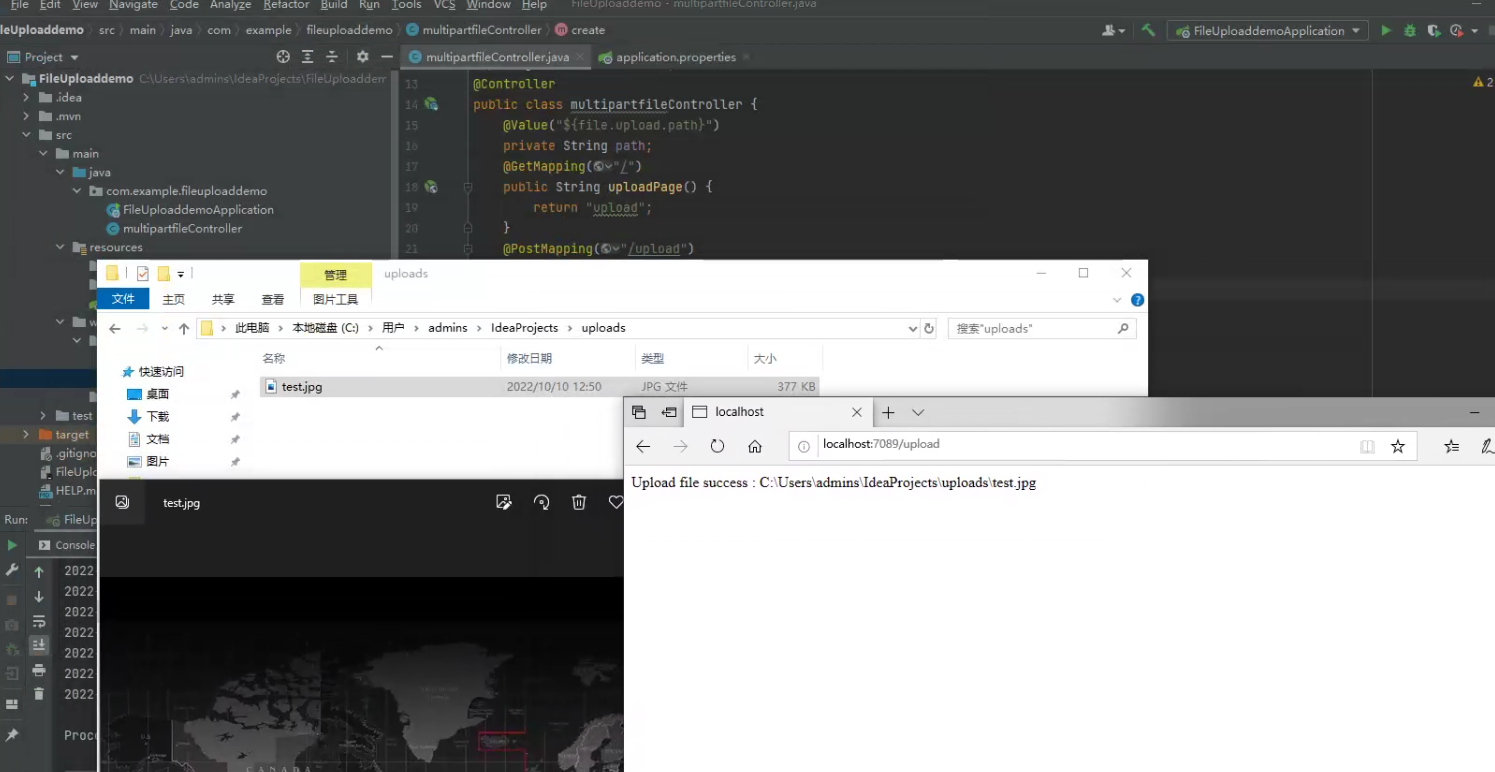
再次启动项目,上传文件,已经可以成功上传: